

How Do I Change My Password?
Published:
When you register with JPay you create a login password. To change this password you can go to the Change Password page and enter a new password.
To change your password
- On the JPay home page, on the Navigation menu, click My Account.
On the My Account menu, click Change Password.
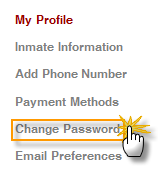
Enter your current password. Then enter your new password twice and click Change Password.
By Aventiv Technologies | | Type: Help Article